July 13, 2026 · 9 min read
How to Verify a Suspected Sonar Target Before Sending Divers
A review procedure for checking a suspected sonar contact across channels, measurements, GPS data, repeat passes, and the operational handoff.
By HumVision Team · HumVision
A promising sonar return should survive a structured review before it becomes an operational target. The reviewer needs to be able to find the original ping, explain what is visible, state what remains uncertain, and hand the position to the person responsible for the next action.
This process does not authorize a dive. Incident command, team procedures, site hazards, available personnel, and the team's training control that decision. Sonar review supplies a documented contact for that decision.
Preserve the source recording
Work from a complete copy of the recording folder. Keep the .DAT, .SON, and .IDX files together and retain the original filenames. Humminbird recordings can contain separate files for 2D, Down Imaging, port Side Imaging, and starboard Side Imaging. Removing one file may remove the channel that explains the contact.
Do not crop the only copy down to a screenshot. A screenshot loses the approach to the target, the returns after it, the paired channel, the GPS track, and the settings needed to understand the frame. It can be useful in a briefing, but it is a derivative image rather than the source data.
HumVision opens the recording folder and keeps contact notes in a sidecar file. The original sonar channel files remain available for another reviewer.
Return to the exact ping
Mark the contact at the frame where the return is clearest. The saved contact should include the ping number, depth, latitude, and longitude available at that point in the recording.
Then move backward and forward through the nearby pings. A fixed object on the bottom should develop across consecutive sonar slices as the boat passes it. A single bright mark that appears for one frame may be noise, interference, or a transient return. The surrounding sequence also shows whether the boat was turning or whether the bottom changed near the contact.
Record what you observe instead of jumping directly to a name. Useful notes include:
- Which side of the boat contains the contact.
- Whether the return persists across adjacent pings.
- Whether the object separates from the bottom.
- Whether a shadow begins at the object's base.
- Whether nearby structure overlaps the return or shadow.
- Whether the track is straight through that section.
Those details let another operator audit the interpretation.
Compare every recorded channel at the same position
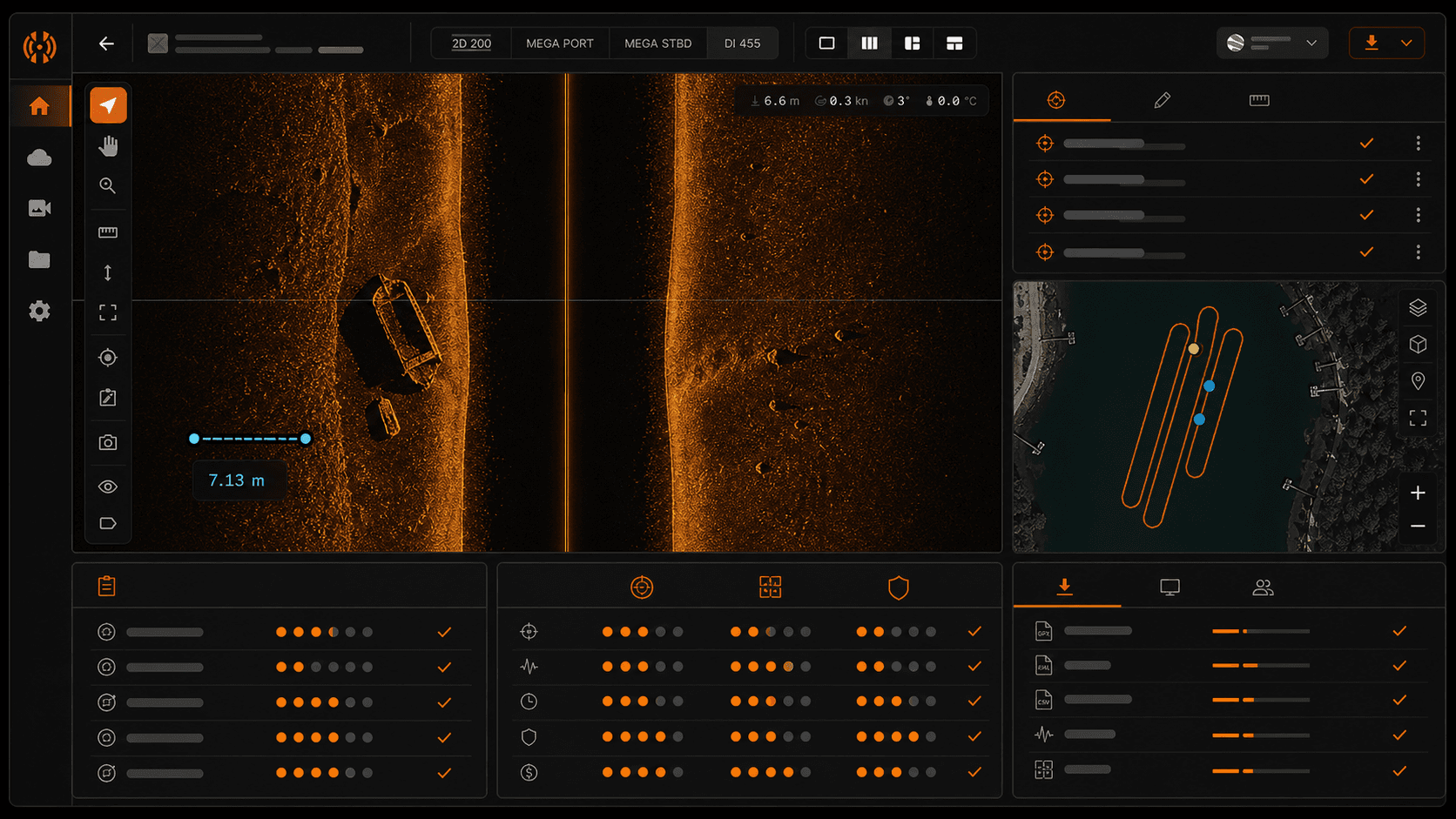
In HumVision, channel tabs share the same ping index. The All Channels view keeps available panes and the playhead synchronized. This makes it possible to compare the recorded data without losing the contact's position on the timeline.
Start with both Side Imaging channels. A target on port should not be copied onto starboard, but the opposite side still provides context about bottom texture, interference, and the quality of the pass. If one side is uniformly weak, the issue may be the installation or obstruction rather than the target.
Next, inspect Down Imaging and 2D if they were recorded. Their absence does not disprove an off-axis Side Imaging contact. These channels look beneath the boat and may never cross an object far to the side. They become more useful when the boat passed over the target or when a second pass was aimed through its position.
The goal is agreement between views where their beam coverage overlaps. A return that appears in more than one relevant channel has more support than a shape inferred from a single presentation. For a channel-by-channel explanation, read Side Imaging vs. Down Imaging vs. 2D sonar.
Inspect the return and the acoustic shadow
Side Imaging displays echo strength and the absence of an echo. Both matter.
An object that reflects sound may appear brighter or darker than the surrounding bottom depending on the selected palette. Its acoustic shadow is the area the transmitted sound could not reach. NOAA's explanation of side-scan sonar describes how return strength and shadow produce the seafloor image.
Ask four separate questions:
- What outline can be supported by the return itself?
- Does the shadow start at the same place as the return?
- Is the shadow consistent with an object rising above the bottom?
- Could terrain or another object have created part of the dark area?
Avoid treating color as a material label. A strong return does not prove metal, and a weak return does not prove organic material. Angle, range, surface shape, bottom type, frequency, and display settings all affect intensity.
When the shadow is clear, HumVision's Shadow Height tool can estimate vertical extent from recorded depth, horizontal range, and shadow length. Treat the result as an estimate. A poorly defined base or shadow tip makes the output less reliable.
Measure only the edges you can defend
Use a target box or ruler on visible boundaries. Do not extend the box through a merged shadow, vegetation, or buried section just to reach the dimensions expected for a target.
Length and width estimates depend on how the object lies relative to the sonar beam. A long object aligned with the boat track is sampled differently from the same object lying across it. Sloped terrain and boat motion can also distort apparent shape.
Save the measurement with a note describing which edges were used. If only one dimension is clear, record one dimension. A partial measurement with a plain limitation is more useful than a precise-looking number built on guessed endpoints.
The contact details guide shows how to store length, width, height, notes, and a Low, Medium, or High confidence rating in HumVision.
Check the position against the GPS track
The contact position comes from the recording's GPS data at that frame. Inspect the track before handing the coordinates to the next team.
Look for a valid path through the search area. A long jump, missing section, repeated coordinate, or position far outside the waterway should lower confidence in the plotted contact. Depth data deserves the same check. A zero or abrupt impossible value may indicate missing or bad source data.
Exporting the point does not improve the source coordinates. HumVision can place contacts and annotations alongside the track in a KML file, but the receiving map still reflects the position recorded on the boat. The KML export guide explains what the file contains.
If the track is questionable, say so in the handoff. Keep the ping and sonar context available so the team can plan another pass rather than treating the exported marker as exact.
Decide whether another sonar pass would answer the uncertainty
A second pass has a specific job. It should test the part of the interpretation that the first pass could not resolve.
Possible reasons include:
- The target was near the edge of the recorded range.
- The boat turned while crossing the contact.
- The object merged with bottom structure.
- The first pass did not carry Down Imaging or 2D over the position.
- The GPS track contains a gap or jump near the contact.
- The shadow or a key edge was cut off.
Plan the new line so the target falls in a better part of the Side Imaging swath or passes beneath the boat for a down-looking view. Preserve the first recording and label the second one clearly. Agreement between independent passes is useful evidence. Disagreement is also useful because it exposes a fragile interpretation before the next team acts on it.
No universal pass count settles every target. Bottom complexity, current, depth, weather, urgency, equipment, and local procedure change the decision.
Assign a confidence level with reasons
Confidence should summarize the evidence, not the reviewer's enthusiasm.
Low confidence fits a contact with incomplete geometry, questionable position, weak repeatability, or heavy overlap from bottom structure.
Medium confidence fits a persistent contact with useful shape or shadow evidence and a plausible position, while important uncertainty remains.
High confidence should require a clear, repeatable return with defensible measurements and position data that supports the classification. High confidence still does not establish identity.
Write the reasons in the notes. "High confidence" alone tells the next operator very little. "Repeatable vehicle-scale return on two passes, clear raised shadow, straight GPS track, east end partly buried" explains what earned the rating and what remains unknown.
Build a handoff another operator can audit
A useful handoff contains:
- Recording and project name.
- Contact label and ping number.
- Coordinates and any position limitation.
- Recorded depth at the contact.
- Channel and side where the contact is clearest.
- Measurements and how they were taken.
- Confidence level with reasons.
- Notes on bottom type, nearby hazards, and possible false positives visible in the sonar.
- Results of any second pass or other sensor check.
- A contact image for quick reference, with the source recording retained.
This gives incident command a concise finding and gives the next sonar reviewer enough information to reproduce it. Operational hazards and dive planning belong in the team's established briefing and are beyond what the sonar recording can determine.
Verification checklist
Before closing the review, confirm that:
- The full source recording is preserved.
- The contact is tied to a ping, depth, and available GPS position.
- Nearby pings were inspected.
- Both Side Imaging channels were checked.
- Down Imaging and 2D were checked where their coverage applies.
- The return and shadow were evaluated separately.
- Measurements use visible, defensible edges.
- The GPS track was inspected for gaps or jumps.
- Any second pass has a stated purpose and separate label.
- Confidence includes written reasons and limitations.
- The handoff preserves a path back to the source data.
HumVision brings those review steps into one desktop workspace for recorded Humminbird data. Start a trial with a training recording and have a second operator repeat the review from the saved contact notes.
Frequently asked questions
Does a clear sonar image remove the need for target confirmation?
No. A clear image supports classification and helps plan the next step. Identity and recovery decisions require the confirmation method and authority defined by the team.
Should a contact appear on every channel?
Only when the relevant beams covered it. A target well to the side may appear on Side Imaging without appearing on a down-looking channel. Compare channels with their geometry in mind.
Should reviewers change display settings during verification?
Yes, when the changes help reveal edges or separate a return from the bottom. Palette, sensitivity, contrast, and sharpness change the display, not the source recording. Check the contact under more than one useful presentation and avoid selecting the view that merely makes the preferred answer look strongest.
In This Article
Share
30-day free trial
Try HumVision Team
Real recording. Real case. 30 days. No charge if it doesn't fit.
Start your free trial